Introduction
IT Operations Analytics (ITOA) is the practice of using big data principles and advanced mathematical algorithms to extract meaningful insights from raw IT operational data. These platforms ingest logs, metrics, events, and traces from across your entire tech stack—on-premises, hybrid, and cloud-native—to provide a unified view of system health. By applying machine learning (ML) and artificial intelligence (AI), ITOA tools can identify complex patterns that are invisible to the human eye, transforming “noisy” data into actionable intelligence.
The importance of ITOA in 2026 cannot be overstated. As organizations move toward 99.999% availability targets, manual troubleshooting is effectively obsolete. Key real-world use cases include proactive incident detection (predicting a failure before it happens), automated root-cause analysis (pinpointing exactly why a transaction failed), and capacity optimization (ensuring resources are allocated efficiently to save costs). When choosing a tool, IT teams must look for robust data ingestion capabilities, “single pane of glass” visualization, AIOps integration, and the ability to scale without performance degradation.
Best for: Large enterprises with complex hybrid-cloud architectures, Site Reliability Engineers (SREs), and Network Operations Centers (NOCs) that need to manage massive alert volumes. It is particularly vital for the BFSI (Banking, Financial Services, and Insurance), Healthcare, and E-commerce sectors where downtime translates directly to significant revenue loss.
Not ideal for: Small startups with minimal infrastructure or companies relying entirely on a single SaaS provider where the vendor manages all operational health. For these users, basic monitoring dashboards or native cloud tools (like AWS CloudWatch) are often sufficient and more cost-effective.
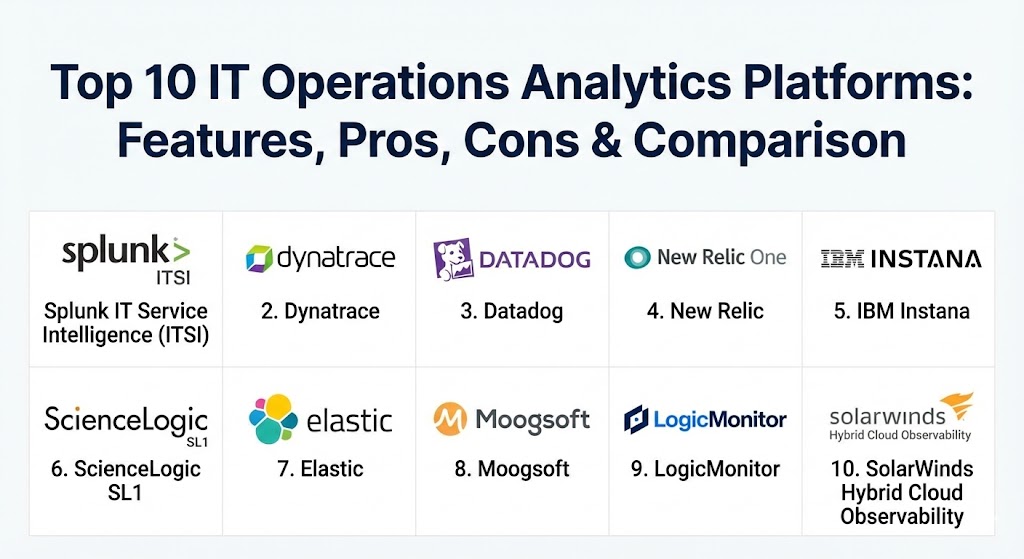
Top 10 IT Operations Analytics Platforms
1 — Splunk IT Service Intelligence (ITSI)
Splunk ITSI is a premium monitoring and analytics solution that sits atop the core Splunk platform. It is designed to provide high-level service health visibility by correlating machine data with business-critical services.
- Key features:
- Service Health Scoring: Maps infrastructure data to business services to show real-time health levels.
- Adaptive Thresholding: Uses machine learning to calculate normal behavior and alert only on true anomalies.
- Predictive Analytics: Can predict potential service outages up to 30–40 minutes in advance.
- Glass Table Visualizations: High-level executive dashboards that link operational data to business KPIs.
- Event Analytics: Automatically groups related events into “epics” to reduce alert noise by up to 90%.
- Deep Integration: Leverages the full power of the Splunk Search Processing Language (SPL).
- Pros:
- Unrivaled for deep-dive log analysis and historical data investigation.
- Extremely powerful ML capabilities that adapt to complex, shifting environments.
- Cons:
- Known for its high “Splunk tax” (cost) which scales rapidly with data volume.
- Significant learning curve; often requires dedicated Splunk-certified staff.
- Security & compliance: SOC 2 Type II, HIPAA, GDPR, PCI DSS, and FIPS 140-2 compliant. Includes detailed audit logs and SSO integration.
- Support & community: Massive “Splunk Answers” community; world-class enterprise support; extensive training through Splunk University.
2 — Dynatrace
Dynatrace is a market-leading observability platform that treats AI (specifically their “Davis” AI) as a first-class citizen. It is designed for automated, full-stack monitoring in modern cloud environments.
- Key features:
- Davis AI Engine: An “always-on” AI that performs precise root-cause analysis rather than just correlating events.
- OneAgent Technology: A single agent that automatically discovers and monitors all components on a host.
- Smartscape Topology: Provides a real-time map of all application and infrastructure dependencies.
- Cloud-Native Observability: Deep visibility into Kubernetes, OpenShift, and serverless architectures.
- Business Micro-Journeys: Tracks user experience and ties performance directly to business outcomes.
- Log Management at Scale: Grails-based storage allows for cost-effective log analytics with zero indexing.
- Pros:
- Superior automation; “it just works” once the agent is installed.
- The AI provides answers, not just more data, which drastically reduces Mean Time to Repair (MTTR).
- Cons:
- The platform can be expensive for very large, high-cardinality environments.
- Highly automated nature can sometimes feel like a “black box” to traditional sysadmins.
- Security & compliance: ISO 27001, SOC 2, HIPAA, GDPR, and FedRAMP authorized. Offers granular RBAC and data masking.
- Support & community: High-touch enterprise support; extensive technical documentation; proactive customer success managers.
3 — Datadog
Datadog has evolved into a comprehensive observability and analytics platform. It is a favorite among DevOps teams due to its ease of use and its “cloud-first” philosophy.
- Key features:
- Unified Telemetry: Combines metrics, logs, and traces in a single, highly interactive interface.
- Watchdog AI: Automatically detects anomalies and outliers across the entire infrastructure.
- Service Map: Real-time visualization of service dependencies and traffic flow.
- Continuous Profiler: Analyzes code performance in production to identify resource-heavy functions.
- Network Performance Monitoring: Deep visibility into VPCs, DNS health, and cross-region traffic.
- Integrations: Supports over 600+ integrations out of the box.
- Pros:
- Exceptional user experience with very low friction to get started.
- Highly modular; you only pay for the specific “pillars” (logs, APM, etc.) you use.
- Cons:
- Pricing can become confusing due to the variety of per-resource and per-feature modules.
- Historical data retention costs can accumulate quickly for long-term analytics.
- Security & compliance: SOC 2, HIPAA, GDPR, and PCI DSS compliant. All data is encrypted at rest and in transit.
- Support & community: Strong online documentation; active Slack community; 24/7 technical support for higher tiers.
4 — New Relic (New Relic One)
New Relic One is a unified observability platform that emphasizes a “data-first” approach. It offers a single repository for all telemetry data, powered by their New Relic Database (NRDB).
- Key features:
- Telemetry Data Platform: A massively scalable backend for metrics, events, logs, and traces.
- Applied Intelligence: ML-based incident detection and alert correlation.
- NerdGraph API: A powerful GraphQL API for custom data querying and automation.
- Errors Inbox: A centralized place for teams to view and triage errors across all services.
- Vulnerability Management: Automatically scans for vulnerabilities in your application dependencies.
- NRQL (New Relic Query Language): Allows for SQL-like querying of any telemetry data.
- Pros:
- Transparent consumption-based pricing (per user + per GB ingested).
- Excellent for cross-team collaboration with shared dashboards and “workloads.”
- Cons:
- The interface can occasionally feel overwhelming due to the sheer volume of data displayed.
- Heavy focus on APM might lead to gaps in traditional deep-infrastructure monitoring.
- Security & compliance: ISO 27001, SOC 2, HIPAA, and GDPR compliant. Includes built-in data obfuscation tools.
- Support & community: New Relic Explorers Hub (community); comprehensive technical training; enterprise support packages.
5 — IBM Instana
Acquired by IBM, Instana is a fully automated Enterprise Observability platform. It is purpose-built for the complexity of microservices and cloud-native applications.
- Key features:
- Automated Continuous Discovery: Automatically detects and maps every component in real-time.
- Context Guide: Provides a visual representation of how any given component fits into the wider stack.
- Unbounded Analytics: Allows users to filter and analyze 100% of all traces without sampling.
- Mobile App Monitoring: Deep insights into mobile user performance and crashes.
- Pipeline Feedback: Correlates CI/CD deployments with performance changes automatically.
- Dynamic Focus: A search-first interface that highlights only relevant performance data.
- Pros:
- No-sampling policy ensures you never miss a single outlier or “edge case” error.
- Seamless integration with the wider IBM and Watson AIOps ecosystem.
- Cons:
- Less robust in traditional “bare metal” or legacy mainframe environments compared to IBM’s older tools.
- Custom visualization options are not as flexible as Datadog or Grafana.
- Security & compliance: SOC 2 Type II, ISO 27001, GDPR, and HIPAA compliant. Enterprise-grade encryption.
- Support & community: Strong IBM enterprise support; comprehensive product documentation; dedicated customer success engineers.
6 — ScienceLogic SL1
ScienceLogic SL1 is a high-performance AIOps and ITOA platform designed for large-scale hybrid cloud environments. It is frequently used by Managed Service Providers (MSPs).
- Key features:
- Generative AI (Skylar): Uses GenAI to provide human-readable summaries of root-cause and remediation steps.
- PowerSync: Automated data synchronization between SL1 and third-party tools like ServiceNow.
- Behavioral Correlation: Links disparate events across network, storage, and cloud layers based on behavior.
- Automated Troubleshooting: Executes “early-stage” diagnostic commands automatically when an alert triggers.
- Multi-Tenancy: Robust support for isolated dashboards and data for different departments or clients.
- Pros:
- Exceptional for multi-cloud and hybrid visibility in a single console.
- Strong focus on automated remediation and workflow orchestration.
- Cons:
- Initial configuration can be complex and typically requires professional services.
- User interface can feel a bit “legacy” compared to Datadog or New Relic.
- Security & compliance: FIPS 140-2, SOC 2, and military-grade security certifications.
- Support & community: Strong partner-led support; professional training; 24/7 global support availability.
7 — Elastic (Elastic Stack for Observability)
The creators of Elasticsearch, Elastic offers an observability solution built on the “ELK stack.” It is the go-to for teams that want deep search capabilities and data flexibility.
- Key features:
- Elasticsearch Backend: High-speed search and analytics engine for massive datasets.
- Kibana Lens: A drag-and-drop visualization tool for creating custom dashboards.
- Machine Learning (Elastic ML): Provides unsupervised anomaly detection and forecasting out of the box.
- Universal Profiling: Agentless continuous profiling for fleet-wide code optimization.
- APM and Log Correlation: Seamlessly links traces to the specific logs that generated them.
- Pros:
- Extremely flexible; if you can ingest the data, you can analyze and search it.
- Strong open-source heritage with a massive library of community-contributed “beats” (data shippers).
- Cons:
- Managing your own Elastic cluster can be a major operational burden (unless using Elastic Cloud).
- Setting up advanced ML and ITOA workflows requires significant manual effort.
- Security & compliance: SOC 2, HIPAA, GDPR, and FedRAMP (in Elastic Cloud). Native encryption and RBAC.
- Support & community: Massive global community; excellent forums; premium support available for subscription tiers.
8 — Moogsoft (by Dell Technologies)
Moogsoft is a pioneer in the AIOps and analytics space. It is designed to sit on top of multiple monitoring tools to act as a “manager of managers.”
- Key features:
- Noise Reduction: Patented algorithms that reduce alert volume by up to 99%.
- Situation Manager: Automatically clusters related alerts from different sources into a single “Situation.”
- Probable Cause: Identifies the most likely source of a failure within a clustered event.
- Collaborative Team Rooms: Virtual spaces for SREs and NOC teams to work on a situation together.
- External Integration: Acts as a central hub for Datadog, Splunk, SolarWinds, and many more.
- Pros:
- Unrivaled at solving “alert fatigue” in very noisy enterprise environments.
- Doesn’t require replacing existing tools; it makes them smarter.
- Cons:
- Primarily focused on event analytics; lacks its own deep log or metric storage.
- As a “secondary” layer, it adds another platform for IT teams to manage.
- Security & compliance: SOC 2, HIPAA, and GDPR compliant. Includes SSO and audit logs.
- Support & community: High-quality enterprise support; professional services focus on workflow design.
9 — LogicMonitor
LogicMonitor is a fully managed, SaaS-based data center and cloud monitoring platform that provides deep ITOA capabilities through its “Envision” layer.
- Key features:
- Agentless Discovery: Collects data via localized collectors, requiring no software on individual servers.
- LM Envision: The analytics layer that provides anomaly detection and forecasting.
- Dashboards and Reporting: Highly customizable, pixel-perfect reports for stakeholders.
- NetFlow and Traffic Analysis: Deep visibility into network congestion and throughput.
- Cloud Cost Optimization: Correlates performance data with cloud spend to find wasted resources.
- Pros:
- Very fast time-to-value; discovery of thousands of devices can happen in minutes.
- Excellent for hybrid environments with a mix of legacy hardware and cloud.
- Cons:
- APM capabilities are not as mature as Dynatrace or New Relic.
- The “per-device” pricing can be less flexible than consumption-based models for cloud workloads.
- Security & compliance: SOC 2 Type II, GDPR, and HIPAA compliant. All data encrypted in transit.
- Support & community: Proactive 24/7 support; “LM Communities” for user sharing; extensive training materials.
10 — SolarWinds Hybrid Cloud Observability
SolarWinds has modernized its legendary Orion platform into a unified “Hybrid Cloud Observability” solution, focused on visibility across the entire stack.
- Key features:
- PerfStack: A drag-and-drop tool to correlate any metric (network, server, DB) on a single timeline.
- AppStack Topology: Visual mapping from the application down through the virtualization layer to the disk.
- NetPath: Visualizes the network path between a user and an application, even across the public internet.
- Predictive Alerting: Calculates dynamic baselines to alert on performance deviations.
- Unified Dashboard: Aggregates logs, metrics, and network data in a single console.
- Pros:
- Deepest historical knowledge of network and infrastructure monitoring in the industry.
- “PerfStack” is one of the most intuitive correlation tools for manual troubleshooting.
- Cons:
- The transition from legacy products to the unified platform can be a complex migration for long-time users.
- Higher resource requirements for the on-premises management server.
- Security & compliance: Significant “Secure by Design” focus; SOC 2, HIPAA, and GDPR compliant.
- Support & community: THWACK community (one of the largest in IT); world-class technical support; extensive online training.
Comparison Table
| Tool Name | Best For | Platform(s) Supported | Standout Feature | Rating (Gartner) |
| Splunk ITSI | High-end Enterprise | On-prem, Cloud, Hybrid | Service Health Scoring | 4.5 / 5 |
| Dynatrace | Cloud-Native / K8s | Cloud, Hybrid | Davis AI (RCA) | 4.6 / 5 |
| Datadog | DevOps / Startups | SaaS | Ease of Integration | 4.5 / 5 |
| New Relic | Collaboration / APM | SaaS | Unified Telemetry Platform | 4.4 / 5 |
| IBM Instana | Microservices | Cloud, Hybrid | No-Sampling Tracing | 4.6 / 5 |
| ScienceLogic | MSPs / Hybrid IT | Cloud, Hybrid | GenAI Root-Cause (Skylar) | 4.4 / 5 |
| Elastic | Deep Log Search | On-prem, Cloud, Hybrid | High-speed Analytics | 4.5 / 5 |
| Moogsoft | Reducing Noise | SaaS | Alert Noise Reduction | 4.4 / 5 |
| LogicMonitor | Fast Discovery | SaaS / Hybrid | Agentless Monitoring | 4.5 / 5 |
| SolarWinds | Infrastructure Teams | Hybrid, On-prem | PerfStack Correlation | 4.3 / 5 |
Evaluation & Scoring of IT Operations Analytics Platforms
We evaluated these tools based on a weighted scoring rubric that reflects the priorities of 2026 IT leaders.
| Criteria | Weight | Evaluation Focus |
| Core Features | 25% | ML/AI depth, anomaly detection, predictive analytics, and root-cause accuracy. |
| Ease of Use | 15% | UI intuitiveness, onboarding speed, and dashboard customization flexibility. |
| Integrations | 15% | Breadth of supported clouds, third-party apps, and ITSM (ServiceNow/Jira) tools. |
| Security & Compliance | 10% | Encryption standards, RBAC, audit logs, and SOC 2/GDPR readiness. |
| Performance | 10% | Query speed, data ingestion latency, and platform uptime/stability. |
| Support & Community | 10% | Documentation quality, community size, and responsiveness of support. |
| Price / Value | 15% | Licensing flexibility, ROI potential, and total cost of ownership (TCO). |
Which IT Operations Analytics Platforms Tool Is Right for You?
Selecting the right platform depends on your organizational maturity and current technical debt.
- Solo Users vs. SMBs: Small teams should look for low-overhead SaaS solutions. Datadog is often the winner here because you can start small and pay for only what you use. Avoid heavy on-prem tools like Splunk unless you have a specific compliance requirement.
- Mid-Market: Organizations with significant growth but limited specialized staff should prioritize automation. Dynatrace or LogicMonitor are ideal because they handle much of the discovery and AI-tuning automatically.
- Enterprise: Large-scale operations need a “manager of managers.” If your current monitoring is fragmented, Moogsoft can consolidate alerts without a full tool replacement. If you need the deepest possible business-linkage, Splunk ITSI remains the gold standard.
- Budget-Conscious vs. Premium: If budget is the primary driver, Elastic (self-hosted) provides the most power for “free,” though you pay in engineering time. New Relic offers some of the most competitive consumption-based pricing in the premium tier.
- Security & Compliance: Organizations in regulated industries (Finance/Health) should verify that the tool has a FedRAMP authorization or the specific FIPS 140-2 validation required by their governing bodies. ScienceLogic and Splunk are particularly strong in this area.
Frequently Asked Questions (FAQs)
1. What is the difference between Monitoring and Analytics (ITOA)? Monitoring tells you if a system is up or down. Analytics (ITOA) uses that data to tell you why it happened, when it might happen again, and what business impact it has.
2. Is AIOps the same as ITOA? No, but they are related. ITOA is the analytics engine; AIOps is the broader practice of using that analytics to automate IT operations, such as automated incident resolution.
3. Can these tools help reduce cloud costs? Yes. Most platforms now include “Cloud FinOps” modules that analyze performance data to find oversized instances or unused resources, potentially saving 20-30% in cloud spend.
4. How long does it take to implement an ITOA platform? SaaS tools like Datadog or LogicMonitor can provide value in hours. Deep enterprise deployments like Splunk or ScienceLogic typically take 3 to 6 months to tune properly.
5. Do these tools require specialized “Data Science” staff? Modern tools are designed to be “ML-ready,” meaning they handle the math in the background. However, for deep custom analytics in Splunk or Elastic, some data engineering skills are beneficial.
6. Is data privacy a concern with cloud-based ITOA? Yes. You should ensure your chosen tool offers “Data Masking” or “PII Redaction” at the source so that sensitive user data (like names or credit cards) is never sent to the provider’s cloud.
7. What is “Alert Fatigue”? It is a state where IT staff receive so many alerts (often duplicates or minor issues) that they begin to ignore them, leading to missed critical failures. ITOA fixes this through event correlation.
8. Can I use these tools for on-premises servers only? Yes. Tools like SolarWinds and Splunk have very strong on-premises deployment models, though most of the market is shifting toward hybrid-first or SaaS-first models.
9. What is “Root Cause Analysis” (RCA)? RCA is the process of identifying the fundamental reason for a failure. Instead of saying “the website is slow,” the AI identifies that “Database X is experiencing high latency due to a bad query.”
10. Why is “Topological Mapping” important? In microservices, one failure can cause a chain reaction. Mapping shows you exactly how service A relies on service B, helping you understand the “blast radius” of a failure.
Conclusion
The “best” IT Operations Analytics platform in 2026 is the one that aligns with your team’s specific pain point. If you are drowning in alerts, Moogsoft or Dynatrace should be your first look. If you need to prove business value to the C-suite, Splunk ITSI or New Relic offer the best visualization. As we move deeper into the era of autonomous IT, the ability to analyze—not just monitor—will be the defining factor between a resilient organization and one that is constantly in “firefighting” mode.
IT operations analytics is evolving toward AI-driven systems that catch failures before they happen. The contrast between Splunk’s deep log analysis and Dynatrace’s automated “Davis AI” shows how specialized the market has become for proactive root-cause fixes. This guide is a solid resource for anyone trying to cut through technical noise and focus on what actually impacts the business.