Introduction
eFax and Fax Server software represent the modernization of the traditional telephony-based document exchange. While eFax (Electronic Fax) typically refers to cloud-based services that allow users to send and receive faxes via email or web portals, Fax Server software provides a more robust, often on-premise or hybrid infrastructure designed for high-volume enterprise routing and deep system integration. These tools eliminate the need for physical phone lines, toner, and paper, replacing them with encrypted digital transmissions that satisfy modern data privacy laws.
The importance of these tools lies in their ability to bridge the gap between legacy requirements and modern digital efficiency. Real-world use cases include healthcare providers transmitting patient referrals in a HIPAA-compliant manner, law firms exchanging signed affidavits that require a verifiable audit trail, and logistics companies processing high-volume bills of lading. When evaluating these tools, users should prioritize security certifications (HITRUST, SOC 2), ease of API integration for automated workflows, and the reliability of delivery confirmations.
Best for: Healthcare administrators, legal professionals, enterprise IT managers, and government agencies that require high-security document exchange and a verifiable paper trail without the overhead of physical hardware.
Not ideal for: Creative freelancers or purely digital startups that operate entirely through secure client portals or Slack and have no regulatory requirement to communicate with legacy industries.
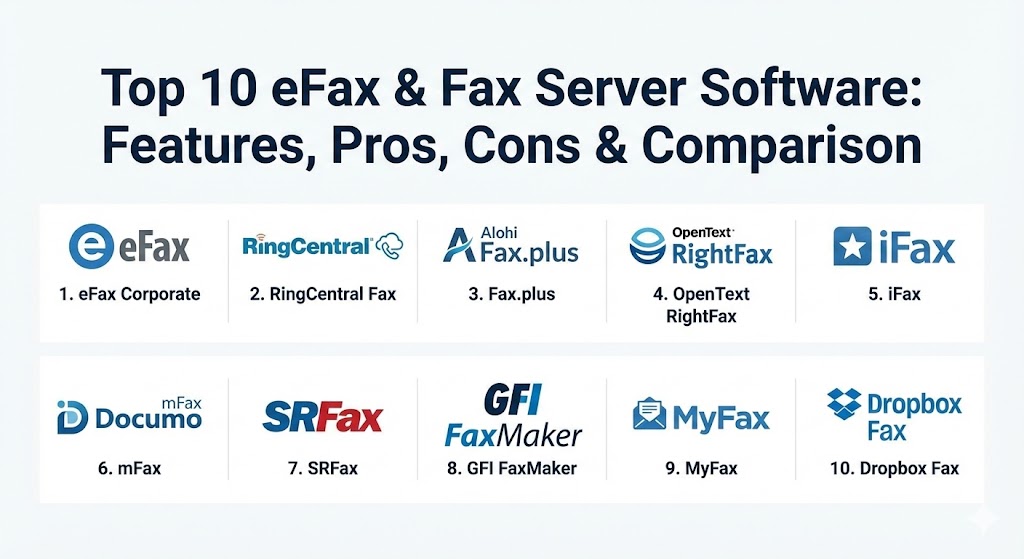
Top 10 eFax & Fax Server Software Tools
1 — eFax Corporate
eFax Corporate is the enterprise-tier offering from Consensus Cloud Solutions. It is widely recognized as the global leader in cloud-based faxing, specifically engineered for highly regulated industries that demand ironclad security and massive scalability.
- Key features:
- HITRUST CSF® certified for the highest level of healthcare data security.
- Secure fax API for integration into ERP, CRM, and EHR systems.
- Supports 256-bit AES encryption and TLS 1.2 for data in transit.
- Advanced administrative portal for managing thousands of users and numbers.
- Fax-to-email and email-to-fax functionality with searchable archives.
- “eFax Protect” module for enhanced HIPAA and BAA compliance.
- Pros:
- Proven reliability with a global infrastructure supporting Fortune 500 companies.
- Excellent interoperability with specialized healthcare platforms like Epic and Oracle Health.
- Cons:
- The pricing is significantly higher than basic consumer-grade fax services.
- The web interface, while functional, can feel a bit complex for small-scale users.
- Security & compliance: HIPAA, HITRUST, SOC 2, PCI-DSS, GLBA, and SOX compliant.
- Support & community: 24/7 enterprise-grade support with dedicated account managers and extensive technical documentation.
2 — RingCentral Fax
RingCentral Fax is a robust, cloud-native faxing solution that is part of the broader RingCentral unified communications suite. It is built for businesses that want a modern, “app-first” approach to document transmission.
- Key features:
- Seamless integration with RingCentral Office for a single communication bill.
- Mobile app functionality that allows faxing directly from iOS or Android devices.
- Built-in cloud storage integration with Dropbox, Google Drive, and Box.
- Supports “Fax Broadcasting” to up to 50 recipients simultaneously.
- Detailed delivery logs and instant email notifications.
- Scalable plans ranging from 1,500 to 3,000 pages per month.
- Pros:
- One of the most polished and modern user interfaces in the industry.
- Outstanding value if bundled with their VoIP and video conferencing services.
- Cons:
- Standalone fax plans are somewhat hidden behind their full UCaaS offerings.
- Lacks some of the ultra-specialized “forensic” audit tools found in dedicated fax servers.
- Security & compliance: HIPAA compliant (with BAA), SOC 2, and SSO integration.
- Support & community: Extensive online knowledge base, 24/7 phone support, and a large global user community.
3 — Fax.plus (by Alohi)
Fax.plus has quickly become a favorite for modern teams due to its exceptional focus on user experience and security. Based in Switzerland, it benefits from some of the world’s strictest data privacy laws.
- Key features:
- Cross-platform support (Web, iOS, Android, Slack, and Google Workspace).
- Secure encrypted archive where each user has a unique encryption key.
- Data residency options allowing you to choose where your faxes are stored.
- Slack integration for receiving and viewing faxes directly in team channels.
- Electronic signature functionality built natively into the platform.
- Developer-friendly API with comprehensive documentation.
- Pros:
- Arguably the most intuitive and aesthetically pleasing UI in the fax market.
- Extremely high security and privacy standards (Swiss-based).
- Cons:
- The free tier is very limited (10 pages lifetime) compared to some competitors.
- Enterprise features like SSO are locked behind the most expensive tiers.
- Security & compliance: HIPAA, SOC 2, ISO 27001, GDPR, and Swiss Privacy compliant.
- Support & community: Excellent email support and a very well-structured help center; highly responsive to user feedback.
4 — OpenText RightFax
RightFax is the “granddaddy” of fax server software. It is a highly powerful, often on-premise or hybrid solution designed for the most demanding enterprise environments that require total control over their telephony.
- Key features:
- Flexible deployment: On-premises, hybrid, or private cloud.
- Deep integration with Microsoft Exchange, SharePoint, and SAP.
- Intelligent fax routing that delivers documents directly to specific folders or users.
- “RightFax Aviator” adds AI-powered data extraction and summaries.
- Advanced load balancing and high-availability disaster recovery options.
- Centralized management for multi-function printers (MFPs) across global offices.
- Pros:
- Unmatched customization: If you can dream of a workflow, RightFax can likely build it.
- Total data sovereignty for organizations that cannot use public cloud faxing.
- Cons:
- Requires a professional IT team to install, configure, and maintain.
- The capital expenditure (CapEx) for licenses and infrastructure is high.
- Security & compliance: FIPS 140-2, HIPAA, PCI DSS, and GDPR.
- Support & community: Extensive partner network for local support; professional services for complex implementations.
5 — iFax
iFax has positioned itself as the “AI-powered” leader in the cloud fax space. It is designed for businesses that want to automate the data entry that often follows receiving a fax.
- Key features:
- AI-powered OCR (Optical Character Recognition) to convert faxes into editable text.
- Programmable Fax API for developers to build custom applications.
- Broadcast faxing capabilities for high-volume outreach.
- HIPAA-compliant secure document exchange platform.
- Multi-platform support including a dedicated Windows and Mac app.
- 256-bit AES encryption for all data at rest and in transit.
- Pros:
- The AI data extraction is a game-changer for reducing manual data entry.
- High-quality mobile and desktop apps that feel like native modern software.
- Cons:
- Some of the most advanced AI features require the “Enterprise” tier.
- Pricing can scale quickly if you exceed monthly page allotments.
- Security & compliance: HIPAA, GLBA, GDPR, and SOC 2.
- Support & community: 24/7 global support and a highly-rated mobile app with over 6.4k positive reviews.
6 — mFax (by Documo)
mFax is a cloud-based fax solution built with a “security-first” mindset. It is particularly popular in the healthcare and legal sectors for its clean interface and reliability.
- Key features:
- Tier-1 carrier network to ensure the highest fax completion rates.
- Robust user management with granular permissions and audit logs.
- Built-in e-signature capabilities to sign documents before faxing.
- “Fax-to-Print” integration for local office needs.
- Advanced document management with tagging and filtering.
- No-install web interface that works on any modern browser.
- Pros:
- Extremely reliable; they use a proprietary routing system to avoid “busy” signals.
- The onboarding process is simple enough for non-technical office staff.
- Cons:
- Lacks the deep legacy ERP integrations found in tools like RightFax.
- Mobile experience is web-based rather than having a standalone native app for all tiers.
- Security & compliance: HIPAA, PCI, SOC 2, and BAA available on all plans.
- Support & community: US-based support team known for being highly responsive and knowledgeable.
7 — SRFax
SRFax is a value-oriented leader in the healthcare space. It provides a straightforward, no-frills service that focuses on being the most reliable “pipe” for sensitive information.
- Key features:
- Specialized healthcare plans with strict HIPAA compliance.
- Email-to-fax and fax-to-email as the primary workflow.
- Unlimited online storage for all faxes sent and received.
- Ability to set “Authorized Email Addresses” for sending faxes.
- Detailed activity reports for easy auditing and billing.
- PHIPA compliance for users based in Canada.
- Pros:
- Some of the best pricing in the industry for HIPAA-compliant faxing.
- Very honest, transparent billing with no hidden “overage” surprises.
- Cons:
- The user interface feels very dated (web 2.0 style).
- Lacks native mobile apps; users must rely on email or mobile web browsers.
- Security & compliance: HIPAA (US) and PHIPA (Canada) compliant; 2048-bit SSL encryption.
- Support & community: Solid technical support, though primarily available during standard business hours.
8 — GFI FaxMaker
GFI FaxMaker is a long-standing fax server solution that is specifically designed to fit perfectly into Microsoft-centric environments. It is a favorite for SMBs that still maintain local servers.
- Key features:
- Integrates natively with Microsoft Exchange and Active Directory.
- Automated fax-to-email routing based on DID (Direct Inward Dialing) numbers.
- Supports both analog/digital telephony and Fax over IP (FoIP).
- Optical Character Recognition (OCR) for searchable fax archives.
- Support for SMS (text messaging) alongside faxing.
- Extensive reporting for usage and cost allocation.
- Pros:
- Makes faxing feel like a native part of the Outlook/Exchange workflow.
- Very predictable licensing model for organizations that prefer CapEx over SaaS.
- Cons:
- Requires local server resources and an IT person to manage updates.
- Not as “cloud-friendly” as the newer SaaS-only providers.
- Security & compliance: HIPAA, SOX, and PCI DSS compatible audit trails.
- Support & community: Strong network of resellers and an active GFI user forum.
9 — MyFax
MyFax is a user-friendly, cloud-based service designed for individuals, freelancers, and home offices. It prioritizes simplicity and quick setup above all else.
- Key features:
- Get a local, toll-free, or international fax number in minutes.
- Fax to multiple recipients (up to 5) simultaneously.
- Mobile app for sending and receiving faxes on the go.
- Support for over 170 different file formats.
- Email-to-fax integration with any major email provider.
- “3-Day Free Trial” for new users to test the service.
- Pros:
- One of the easiest tools for a single person to set up and start using immediately.
- Very affordable for light usage (fewer than 100 pages per month).
- Cons:
- Not designed for complex enterprise workflows or high-volume automation.
- Customer support can be slower than the dedicated enterprise tiers of eFax.
- Security & compliance: Standard SSL encryption; compliance varies by plan (not all plans include a BAA).
- Support & community: Basic email and phone support; focused on consumer-level troubleshooting.
10 — Dropbox Fax (formerly HelloFax)
Dropbox Fax is a modern, cloud-first solution that is deeply integrated into the Dropbox ecosystem. It is designed for small teams that already live in the cloud.
- Key features:
- Deep integration with Dropbox, Google Drive, Box, and OneDrive.
- Built-in digital signature tool for signing faxes on screen.
- Team management features allowing up to 5 users on basic plans.
- No setup fees and a “cancel anytime” policy.
- Clean, distraction-free interface focused on document tasks.
- Inbound faxing included in all paid plans.
- Pros:
- If you already use Dropbox, this is the most seamless experience possible.
- The e-signature integration saves the “print-sign-scan” step entirely.
- Cons:
- Higher overage fees ($0.99 per fax after the limit) for high-volume users.
- No native mobile app (users must use the mobile web interface).
- Security & compliance: SOC 2 Type II and HIPAA (on Enterprise plans).
- Support & community: Solid email support and a massive global community of Dropbox users.
Comparison Table
| Tool Name | Best For | Platform(s) Supported | Standout Feature | Rating (Gartner / G2) |
| eFax Corporate | High-Compliance Enterprise | Web, Mobile, API | HITRUST CSF Certification | 4.8 / 5 |
| RingCentral Fax | Unified Comms Bundle | iOS, Android, Desktop | Mobile app experience | 4.6 / 5 |
| Fax.plus | Modern Teams / Privacy | Slack, Web, Mobile | Swiss Data Privacy | 4.8 / 5 |
| OpenText RightFax | Legacy/Hybrid Power | Windows, Hybrid | Deep ERP Integrations | 4.4 / 5 |
| iFax | Automation & AI | Multi-platform, API | AI-powered OCR | 4.8 / 5 |
| mFax | Healthcare Security | Web-based | Tier-1 Carrier Reliability | 4.7 / 5 |
| SRFax | Healthcare Value | Email-to-Fax | Best Healthcare Pricing | 4.5 / 5 |
| GFI FaxMaker | Microsoft/SMB | Windows Server | Active Directory Sync | 4.4 / 5 |
| MyFax | Home Office / Personal | Web, Mobile | Instant Setup | 4.6 / 5 |
| Dropbox Fax | Cloud Collaboration | SaaS / Cloud | E-Signature Integration | 4.5 / 5 |
Evaluation & Scoring of eFax & Fax Server Software
When selecting a tool, we use the following weighted rubric to determine which solution offers the most long-term value for a professional organization.
| Category | Weight | Evaluation Criteria |
| Core Features | 25% | Reliability, page volume handling, and protocol support (FoIP vs Analog). |
| Ease of Use | 15% | UI modernness, mobile app quality, and administrative dashboard clarity. |
| Integrations | 15% | API depth, email-to-fax, and native connectors for EHR/ERP systems. |
| Security & Compliance | 10% | HIPAA, HITRUST, SOC 2, and encryption standards. |
| Performance | 10% | Uptime, fax completion rates, and speed of confirmation receipts. |
| Support & Community | 10% | 24/7 availability, documentation depth, and training resources. |
| Price / Value | 15% | Total cost of ownership versus the features and compliance provided. |
Which eFax & Fax Server Tool Is Right for You?
Deciding between a simple cloud service and a full-blown fax server depends on your daily volume and regulatory requirements.
- Solo Users vs SMB vs Enterprise: Solo users should look at MyFax or Dropbox Fax for simplicity. SMBs with high volume will find the best balance in Fax.plus or RingCentral. Large enterprises with thousands of users should only consider eFax Corporate or RightFax.
- Budget-Conscious vs Premium: SRFax is the budget king for compliance. eFax Corporate is the premium choice where you pay for the peace of mind of HITRUST certification.
- Feature Depth vs Ease of Use: iFax offers the most futuristic features (AI/OCR), while Fax.plus offers the easiest “pick up and use” experience for non-tech users.
- Integration and Scalability Needs: If you need your fax system to “talk” to your hospital’s patient database or your global SAP instance, RightFax or eFax Corporate are the only realistic options.
- Security and Compliance Requirements: If you are in healthcare, never choose a plan that doesn’t offer a BAA (Business Associate Agreement). Tools like mFax and SRFax include this by default on their business tiers.
Frequently Asked Questions (FAQs)
1. Is eFax more secure than traditional faxing? Yes. Traditional faxes often sit on open trays where anyone can read them. eFax is encrypted end-to-end and delivered directly to a secure user inbox or portal.
2. Can I keep my current fax number? Most professional providers (like eFax and Fax.plus) offer “Number Porting,” allowing you to move your existing fax number to their digital service.
3. Do I still need a phone line? No. eFax and cloud fax servers use your internet connection (FoIP – Fax over IP) to transmit data, eliminating the need for analog landlines.
4. What is a BAA and why do I need it? A BAA (Business Associate Agreement) is a legal document required by HIPAA. It states that the service provider will take responsibility for protecting patient data.
5. How does Fax-to-Email work? When someone sends a fax to your digital number, the provider converts it into a PDF attachment and sends it to your email address.
6. Can I send a fax from my smartphone? Yes, most top tools (like RingCentral and iFax) have dedicated apps that let you take a photo of a document and fax it instantly.
7. What happens if my computer is turned off? Because the service is cloud-based, your faxes are received by the provider’s servers and stored in your account until you log in to see them.
8. Is there a limit on how many pages I can send? Most services have monthly “page buckets” (e.g., 500 pages/month). You can always send more, but you will be charged a small per-page overage fee.
9. Can I fax internationally? Yes, though some providers charge higher rates for international faxes or require you to enable international permissions in your settings.
10. What is “Fax Server” software vs “eFax”? eFax is usually a third-party managed service. A Fax Server is software you (or a private cloud provider) manage yourself to handle massive internal routing and custom security.
Conclusion
The “best” fax solution in 2026 is no longer about the hardware—it’s about the workflow. Whether you choose the user-friendly simplicity of Fax.plus, the AI-driven power of iFax, or the enterprise-grade stability of eFax Corporate, the goal is to make document exchange as invisible and secure as possible. When making your final decision, prioritize the compliance standards of your specific industry and the integration needs of your existing software stack.