Introduction
PLC Programming Tools allow engineers to translate human-intended logic into machine-executable instructions. Most modern tools adhere to the IEC 61131-3 standard, which defines five programming languages: Ladder Diagram (LD), Function Block Diagram (FBD), Structured Text (ST), Instruction List (IL), and Sequential Function Chart (SFC).
The importance of these tools extends beyond simple code entry. They provide sophisticated simulation environments, real-time diagnostics, and hardware configuration management. In a world moving toward Industry 4.0, these tools now incorporate cloud connectivity, cybersecurity features, and edge computing capabilities. Choosing the right tool depends on the hardware being used, the complexity of the motion control required, and the regional standards of the industry.
Best for: Control engineers, systems integrators, and maintenance technicians in manufacturing, automotive, water treatment, and energy sectors. These tools are essential for mid-to-large-scale industrial operations that require high reliability and precise automation.
Not ideal for: Hobbyists or small-scale makers who may find the high licensing costs and steep learning curves prohibitive. In such cases, open-source alternatives like OpenPLC or simple microcontroller IDEs (like Arduino) might be more appropriate.
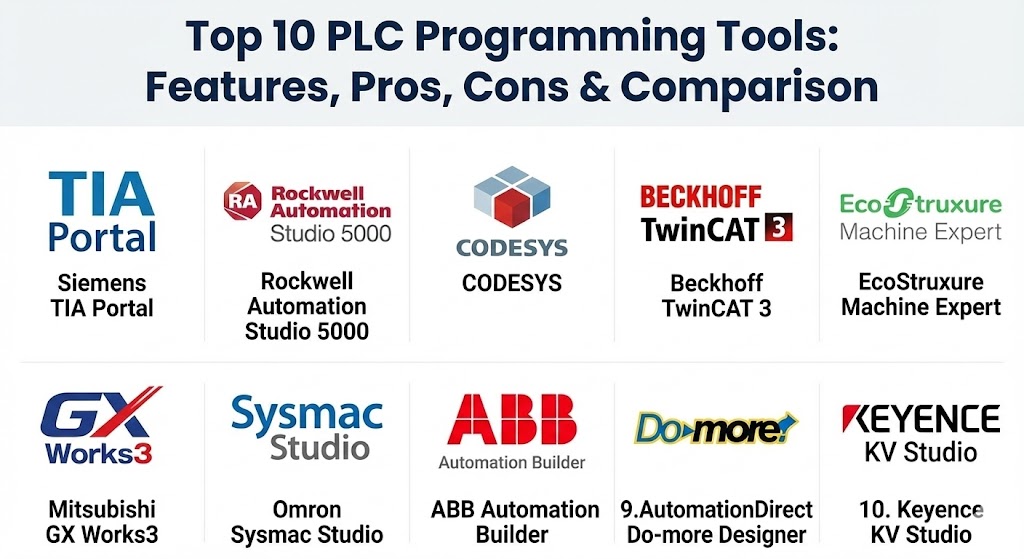
Top 10 PLC Programming Tools
1 — Siemens TIA Portal (Totally Integrated Automation)
TIA Portal is the industry benchmark for integrated engineering. It provides a unified environment for programming Siemens PLCs (S7-1200, S7-1500), HMI screens, and motor drives.
- Key features:
- Unified engineering framework for PLC, HMI, and Drive.
- PLCSIM Advanced for high-fidelity digital twin simulations.
- Multiuser Engineering for simultaneous team collaboration.
- Library management for reusable code blocks across projects.
- Integrated system diagnostics and energy management.
- Support for all IEC 61131-3 languages plus SCL (Structured Control Language).
- Pros:
- Unmatched integration between hardware components.
- Excellent diagnostic tools that pinpoint hardware faults automatically.
- Cons:
- Significant system resource requirements (demands a high-end PC).
- High licensing costs and complex version compatibility.
- Security & compliance: Encrypted communication (TLS), user management (UMAC), audit logs, and compliance with IEC 62443.
- Support & community: Extensive global support network, Siemens Industry Online Support (SIOS) portal, and a massive community of certified engineers.
2 — Rockwell Automation Studio 5000
The standard-bearer in North America, Studio 5000 Logix Designer is used to program Allen-Bradley ControlLogix and CompactLogix controllers. It is renowned for its tag-based architecture.
- Key features:
- Tag-based programming (no fixed memory addresses).
- Integrated motion control using PLCopen instructions.
- Add-On Instructions (AOI) for creating custom, reusable logic.
- Logical Organizer for structured project navigation.
- Logix Echo for emulating the latest controller hardware.
- Direct integration with FactoryTalk View for HMI development.
- Pros:
- Exceptionally intuitive for North American engineers familiar with “Logix” style.
- Very powerful online editing capabilities (change code while the machine runs).
- Cons:
- Moving to a subscription-based model has increased costs for some users.
- Historically less flexible with third-party hardware compared to European rivals.
- Security & compliance: FactoryTalk Security for SSO, role-based access control (RBAC), and FIPS 140-2 compatibility.
- Support & community: Robust training programs (Rockwell University) and a vast network of local distributors.
3 — CODESYS
CODESYS is the world’s leading manufacturer-independent software for industrial automation. It serves as the base for many other tools on this list (like ABB and Schneider).
- Key features:
- Hardware-agnostic (runs on over 400 different PLC brands).
- Built-in Visualization (WebVisu) for creating HMI screens.
- Professional Developer Edition with Git/SVN integration.
- Support for Object-Oriented Programming (OOP) in PLC logic.
- SoftPLC capability (turn a Raspberry Pi or PC into a PLC).
- Large library of fieldbus drivers (EtherCAT, PROFINET, Modbus).
- Pros:
- Free to download and learn (Basic version).
- Maximum flexibility; you aren’t locked into a single hardware vendor.
- Cons:
- Users must manage their own libraries and firmware versions more carefully.
- Commercial runtime licenses are required for actual production hardware.
- Security & compliance: X.509 certificate support, encrypted boot applications, and user management.
- Support & community: Very active online forum (CODESYS Forge) and a global community of open-source enthusiasts.
4 — Beckhoff TwinCAT 3
TwinCAT 3 turns nearly any Windows-based PC into a real-time controller. It is the gold standard for high-speed PC-based control and EtherCAT-based systems.
- Key features:
- Integration into Microsoft Visual Studio.
- Support for C/C++ and MATLAB/Simulink alongside IEC languages.
- Multi-core CPU support (distribute PLC tasks across cores).
- Scientific Automation (robotics, vision, and measurement in one tool).
- XTS (eXtended Transport System) configuration tools.
- Native EtherCAT master with microsecond scan times.
- Pros:
- The most “IT-friendly” PLC tool, allowing modern software practices like version control.
- Incredible performance for high-speed motion and robotics.
- Cons:
- Running on Windows introduces OS management overhead (updates, security).
- Steep learning curve for those coming from traditional “Ladder-only” backgrounds.
- Security & compliance: Secure ADS communication, certificate-based encryption, and Windows-level security protocols.
- Support & community: Strong technical documentation and a growing presence in high-tech manufacturing.
5 — Schneider Electric EcoStruxure Machine Expert
Formerly known as SoMachine, this CODESYS-based tool is optimized for Schneider’s Modicon range of controllers. It balances ease of use with powerful B2B integration.
- Key features:
- Template-based project creation for rapid machine building.
- Integrated safety and motion configuration.
- Cloud-based collaboration through EcoStruxure Machine Advisor.
- Unified HMI and PLC variable database.
- Support for Vijeo Designer and Operator Terminal Expert.
- Advanced diagnostic dashboards.
- Pros:
- Excellent templates that can save weeks of development time.
- Strong “Machine-to-Cloud” connectivity for IIoT applications.
- Cons:
- Can be confusing due to the transition between legacy software names.
- Heavy installation package.
- Security & compliance: SOC 2 (Cloud components), GDPR, and built-in user access management.
- Support & community: Large global presence with specialized support for the food and beverage and packaging industries.
6 — Mitsubishi GX Works3
Part of the iQ Works suite, GX Works3 is the premier tool for Mitsubishi’s MELSEC series PLCs. It is highly efficient for high-speed discrete manufacturing.
- Key features:
- Graphic-based system configuration (drag-and-drop hardware).
- Module Label/FB for easy data management.
- Integrated Motion Setup for simple axis configuration.
- Extensive simulation tools for offline debugging.
- Multi-language menu support for global teams.
- Built-in version control and comparison tools.
- Pros:
- Extremely fast execution times; ideal for high-speed packaging lines.
- The “Module Label” system drastically reduces variable mapping errors.
- Cons:
- The UI can feel cluttered compared to modern Western IDEs.
- Documentation is sometimes translated from Japanese, leading to minor clarity issues.
- Security & compliance: Password protection for blocks, hardware execution keys, and audit logs.
- Support & community: Dominant in the Asian market; strong support in specialized electronics manufacturing regions.
7 — Omron Sysmac Studio
Sysmac Studio provides a “One Software” environment for the NJ/NX series controllers, integrating logic, motion, safety, and vision into a single project.
- Key features:
- Unified environment for Logic, Motion, Safety, Vision, and Robotics.
- 3D Simulation for mechanical and electrical verification.
- Compliance with PLCopen Motion Control standards.
- Integrated Git for distributed version control.
- Intelligent Application Gadgets (IAG) for HMI modularity.
- Graphical CAM editor for complex motion profiles.
- Pros:
- The 3D simulation is one of the best in the industry for visualizing machine movement.
- Very clean, modern user interface.
- Cons:
- Requires specific hardware (NJ/NX series) to take full advantage of the features.
- Licensing can be tiered (Lite vs. Standard), which requires careful selection.
- Security & compliance: 32-digit security passwords, read/write protection, and SSL/TLS support.
- Support & community: Strong presence in the automotive and robotics sectors with excellent hands-on training.
8 — ABB Automation Builder
Based on CODESYS, Automation Builder is ABB’s integrated environment for PLCs, drives, and motion control. It is particularly strong in heavy industrial applications.
- Key features:
- Integrated safety engineering for AC500-S safety PLCs.
- Drive Composer integration for fine-tuning ABB motor drives.
- Multi-user engineering with Subversion (SVN) support.
- Virtual commissioning through integrated simulation.
- Support for C-code integration for complex algorithms.
- Extensive libraries for water, building automation, and solar.
- Pros:
- Best-in-class integration with high-power industrial drives.
- Strong focus on functional safety.
- Cons:
- The interface can be overwhelming due to the sheer number of configuration options.
- Slower installation and update cycles.
- Security & compliance: IEC 62443 compliance, encrypted project files, and user role management.
- Support & community: Excellent for heavy industry and infrastructure projects.
9 — AutomationDirect Do-more Designer
Do-more Designer is the software for the BRX, H2-series, and T1H-series PLCs. It is the go-to for budget-conscious engineers who still need professional features.
- Key features:
- Free to download and use (no licensing fees).
- Integrated Simulator with full I/O mapping.
- Built-in help system with video tutorials.
- Strong math instruction set (MATH instruction allows C-like expressions).
- Easy data logging to local memory or microSD.
- Cloud connectivity via MQTT.
- Pros:
- Zero cost. You can download it today and start learning.
- Extremely lightweight and fast to open compared to TIA Portal.
- Cons:
- Limited to AutomationDirect hardware.
- Lacks the advanced robotics and vision integration of high-end suites.
- Security & compliance: Basic password protection and secure MQTT for IoT.
- Support & community: Famous for “Free Support” and an incredible YouTube library of “How-to” videos.
10 — Keyence KV Studio
Keyence is known for its “ultra-fast” hardware, and KV Studio is the software designed to manage that speed. It is highly optimized for the KV-8000/7000 series.
- Key features:
- Real-time monitoring with “High-speed Recording.”
- Auto-generation of documentation from the project logic.
- Integrated HMI creation tool.
- Script-based programming for complex math.
- One-click hardware configuration.
- Advanced troubleshooting tools (trace functions).
- Pros:
- The fastest hardware/software interaction; ideal for sub-millisecond tasks.
- Keyence’s “Direct Support” model is industry-leading.
- Cons:
- Highly proprietary; Keyence does not follow standard distribution channels.
- Very high cost for both hardware and software.
- Security & compliance: Hardware-linked execution keys and password protection.
- Support & community: Exceptional on-site support from Keyence engineers, but limited public online forums.
Comparison Table
| Tool Name | Best For | Platform(s) Supported | Standout Feature | Rating (Gartner/TrueReview) |
| Siemens TIA Portal | Large-scale manufacturing | Windows | Totally Integrated Automation | 4.8 / 5 |
| Studio 5000 | North American Enterprises | Windows | Tag-based Programming | 4.7 / 5 |
| CODESYS | Multi-vendor / SoftPLC | Windows, Linux | Vendor Neutrality | 4.6 / 5 |
| TwinCAT 3 | PC-based / High-speed | Windows | Visual Studio Integration | 4.5 / 5 |
| Machine Expert | Process & B2B Integration | Windows | Cloud-Ready Templates | 4.4 / 5 |
| GX Works3 | Electronics / High-speed | Windows | iQ Platform Efficiency | 4.3 / 5 |
| Sysmac Studio | Robotics & Vision | Windows | 3D Machine Simulation | 4.6 / 5 |
| Automation Builder | Heavy Industry / Drives | Windows | Safety PLC Integration | 4.4 / 5 |
| Do-more Designer | Budget / Small Projects | Windows | 100% Free Software | 4.5 / 5 |
| KV Studio | Ultra-high performance | Windows | Real-time Trace Recording | 4.7 / 5 |
Evaluation & Scoring of PLC Programming Tools
To help you decide, we have evaluated these tools against a weighted rubric representing the priorities of a modern automation department.
| Category | Weight | Score (Avg) | Evaluation Notes |
| Core Features | 25% | 9.5/10 | Most tools now exceed standard IEC requirements. |
| Ease of Use | 15% | 7.5/10 | Complexity is high due to multi-disciplinary features. |
| Integrations | 15% | 9.0/10 | Cloud (IIoT) and HMI integration are now standard. |
| Security | 10% | 8.5/10 | Massive improvements in cybersecurity (IEC 62443). |
| Performance | 10% | 9.0/10 | Real-time capabilities are at an all-time high. |
| Support | 10% | 8.0/10 | Direct vendor support is critical and usually good. |
| Price / Value | 15% | 6.5/10 | Licensing remains the biggest pain point for users. |
Which PLC Programming Tool Is Right for You?
Solo Users vs. Enterprise
If you are an independent contractor or a student, CODESYS or Do-more Designer are your best starting points. CODESYS gives you broad marketability, while Do-more is free. Enterprises, however, should stick to Siemens or Rockwell to ensure long-term support and a steady supply of trained personnel.
Budget-Conscious vs. Premium
AutomationDirect is the undisputed king of budget automation. On the opposite end, Keyence and Beckhoff offer premium performance where the cost of the software is justified by the micro-seconds saved in production cycle times.
Feature Depth vs. Ease of Use
If you need deep robotics and vision, Sysmac Studio is unrivaled for its “One Software” feel. If you just need a reliable machine that runs simple ladder logic, GX Works3 or Studio 5000 are more straightforward for traditional electricians and technicians.
Integration and Scalability
For those building a “Smart Factory,” TIA Portal offers the most comprehensive ecosystem. For PC-based specialists who want to integrate C++ or Python, TwinCAT 3 is the only logical choice.
Frequently Asked Questions (FAQs)
1. Can I learn PLC programming for free?
Yes. You can download CODESYS or Do-more Designer for free. Both include built-in simulators that allow you to write and test code without buying hardware.
2. What is the most popular PLC language?
Ladder Diagram (LD) is the most common because it resembles electrical relay logic, making it easy for electricians to troubleshoot. However, Structured Text (ST) is gaining popularity for complex math.
3. Do these tools run on Mac or Linux?
Almost all professional PLC IDEs are Windows-only. While CODESYS has a Linux runtime, the development environment still requires Windows. Many engineers use Virtual Machines (VMs) to manage this.
4. What is a “SoftPLC”?
A SoftPLC is software (like CODESYS or TwinCAT) that allows a standard PC or industrial PC to function exactly like a dedicated PLC hardware brick.
5. How much does a TIA Portal license cost?
A full professional license can range from $2,000 to $5,000+, plus annual maintenance fees. Basic versions for smaller PLCs are significantly cheaper.
6. Is PLC programming similar to C++?
Structured Text (ST) is similar to Pascal or C. However, PLC programming is cyclic (loops thousands of times per second), which is a different paradigm than standard event-driven PC programming.
7. Can I use Git for version control with PLCs?
Yes, but it’s difficult with “binary” project files. Tools like TwinCAT, CODESYS, and Sysmac Studio have native Git integration to help manage changes.
8. What is the difference between a PLC and a DCS?
A PLC is usually for discrete tasks (on/off, fast motion), while a DCS (Distributed Control System) is for process control (chemical plants, oil refineries) where thousands of continuous loops are managed.
9. Why are PLC tools so “heavy”?
They contain thousands of hardware drivers, documentation files, and simulation engines. A full TIA Portal install can take up over 50GB of disk space.
10. What is a “Tag-based” PLC?
Older PLCs used memory addresses (like N7:0). Modern tag-based PLCs (like Studio 5000) allow you to name variables directly (like Motor_Speed), making the code much easier to read.
Conclusion
The “best” PLC programming tool isn’t defined by its features alone, but by the ecosystem it supports. In North America, Studio 5000 remains the dominant force, while TIA Portal leads the global manufacturing stage. For those seeking flexibility, CODESYS provides a bridge across brands, and TwinCAT pushes the boundaries of what a PC can do on the factory floor.
Ultimately, your choice should be dictated by your hardware requirements, your team’s existing skill set, and your budget. For most, the journey starts with a free simulator—so download a tool today and start automating!