Introduction
Spatial computing toolkits are software frameworks and libraries that enable developers to create immersive, context-aware, and interactive digital experiences in three-dimensional space. These platforms integrate AR (Augmented Reality), VR (Virtual Reality), XR (Extended Reality), IoT (Internet of Things), and real-time 3D visualization to provide applications that understand and interact with physical environments. Spatial computing toolkits are revolutionizing fields such as gaming, industrial automation, healthcare, architecture, education, and smart city development.
The importance of spatial computing lies in its ability to merge digital and physical worlds, offering real-time data visualization, interactive simulations, and predictive analytics. Use cases include immersive training environments, industrial process simulations, smart building monitoring, digital twins, and location-based AR applications. When evaluating spatial computing toolkits, developers should consider multi-platform support, integration with AR/VR hardware, real-time 3D rendering capabilities, scalability, ease of use, SDK availability, and analytics tools.
Best for:
Game developers, industrial engineers, architects, healthcare professionals, educators, and R&D teams in enterprises looking to develop interactive 3D and spatial applications benefit most from these toolkits.
Not ideal for:
Organizations or individuals without AR/VR hardware, IoT infrastructure, or 3D content requirements may find these platforms excessive. Lightweight 2D or web-based applications may not require full spatial computing capabilities.
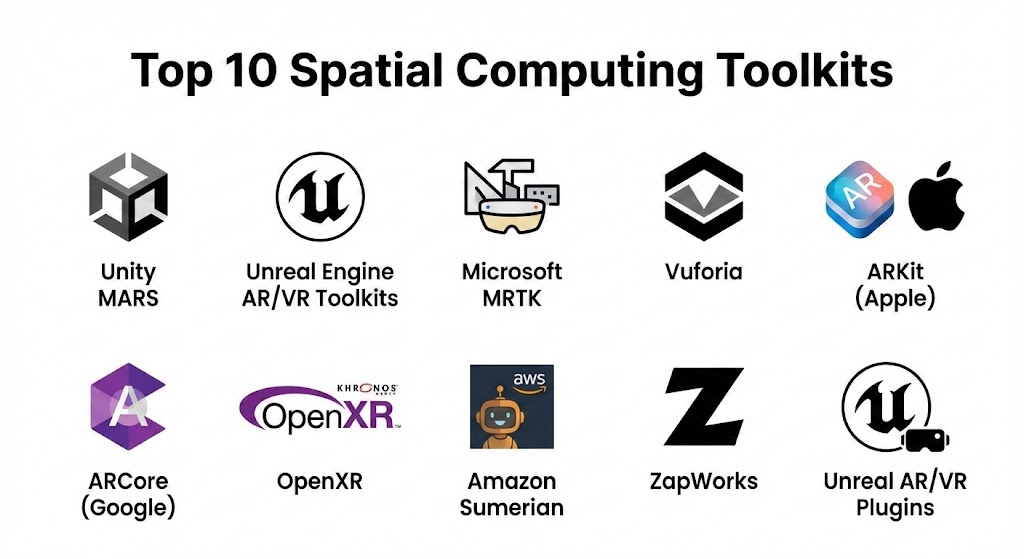
Top 10 Spatial Computing Toolkits Tools
1 — Unity MARS
Short description:
Unity MARS is a spatial computing toolkit designed for building AR and mixed reality experiences with environmental awareness.
Key features:
- Real-time environmental understanding
- AR scene simulation and testing
- Smart object placement and behavior
- Multi-platform deployment
- Integration with Unity engine
- Real-world data simulation
- Collaborative development tools
Pros:
- Accelerates AR/MR development
- Strong Unity integration
- Supports real-world environment simulation
Cons:
- Requires Unity expertise
- Limited VR-specific features
Security & compliance:
Varies / N/A
Support & community:
Unity documentation, forums, tutorials, enterprise support.
2 — Unreal Engine AR/VR Toolkits
Short description:
Unreal Engine provides spatial computing capabilities with high-fidelity graphics for AR, VR, and XR development.
Key features:
- Photorealistic real-time rendering
- Cross-platform AR/VR support
- Blueprint visual scripting
- Multi-device deployment
- VR templates and sample projects
- Physics simulation and interaction
- Marketplace assets and plugins
Pros:
- Exceptional visual fidelity
- Supports complex VR simulations
- Extensive plugin ecosystem
Cons:
- High system requirements
- Steep learning curve
Security & compliance:
Varies / N/A
Support & community:
Epic Games documentation, forums, tutorials.
3 — Microsoft Mixed Reality Toolkit (MRTK)
Short description:
MRTK is a toolkit for developing AR/VR experiences on Microsoft HoloLens and Windows Mixed Reality devices.
Key features:
- Spatial mapping and anchoring
- Gesture and voice input handling
- Prebuilt UI components for AR/VR
- Integration with Unity
- Simulation and testing tools
- Multi-platform support
- Sample projects and templates
Pros:
- Optimized for HoloLens
- Accelerates AR application development
- Supports multiple input modalities
Cons:
- Limited to Microsoft ecosystem
- Requires Unity for full functionality
Security & compliance:
Varies / N/A
Support & community:
Microsoft documentation, GitHub, tutorials.
4 — Vuforia
Short description:
Vuforia is an AR-focused toolkit offering object and image recognition for spatial computing applications.
Key features:
- Image and object recognition
- Model target 3D tracking
- Cloud recognition support
- Unity integration
- AR analytics and reporting
- Mobile device compatibility
- Prebuilt AR templates
Pros:
- Fast AR prototyping
- Strong mobile device support
- Reliable object tracking
Cons:
- Limited VR functionality
- Cloud services may increase cost
Security & compliance:
Varies / N/A
Support & community:
Documentation, forums, developer support.
5 — ARKit (Apple)
Short description:
ARKit is Apple’s AR development toolkit for iOS devices, enabling device-aware AR applications.
Key features:
- Plane detection and scene understanding
- Motion tracking using device sensors
- Light estimation and shadows
- Face and image tracking
- AR session management
- Integration with Swift and Unity
- Real-time AR visualization
Pros:
- Optimized for iOS devices
- Smooth AR performance
- Advanced AR features
Cons:
- Limited to Apple ecosystem
- No VR support
Security & compliance:
Varies / N/A
Support & community:
Apple developer documentation, tutorials, forums.
6 — ARCore (Google)
Short description:
ARCore is Google’s toolkit for developing AR applications on Android devices.
Key features:
- Motion and environmental tracking
- Light estimation
- Plane and anchor detection
- Cloud Anchors for shared AR experiences
- Unity and Unreal integration
- Scene visualization
- AR analytics support
Pros:
- Optimized for Android devices
- Supports multi-user AR
- Integration with major engines
Cons:
- Limited VR features
- Device compatibility varies
Security & compliance:
Varies / N/A
Support & community:
Google documentation, forums, tutorials.
7 — OpenXR
Short description:
OpenXR is an open standard for AR/VR application development, providing cross-platform spatial computing support.
Key features:
- Hardware-agnostic AR/VR API
- Device-agnostic input support
- Cross-platform engine integration
- Standardized rendering pipeline
- Open-source community support
- Real-time interaction APIs
- Continuous updates and extensions
Pros:
- Promotes interoperability
- Reduces platform-specific code
- Supports multiple devices
Cons:
- Requires engine integration
- Emerging standard with limited legacy support
Security & compliance:
Varies / N/A
Support & community:
Open-source community, GitHub, documentation.
8 — Amazon Sumerian
Short description:
Amazon Sumerian is a cloud-based AR/VR toolkit for creating interactive experiences without extensive coding.
Key features:
- Browser-based AR/VR development
- Prebuilt 3D assets and templates
- Scriptable behaviors and animations
- AWS backend integration
- Real-time collaboration
- Multi-platform deployment
- Cloud hosting
Pros:
- Low-code development
- Fast prototyping
- AWS integration
Cons:
- Limited advanced rendering
- Dependent on AWS services
Security & compliance:
AWS security, ISO and SOC 2-compliant
Support & community:
AWS documentation, tutorials, forums.
9 — ZapWorks
Short description:
ZapWorks is a toolkit for creating WebAR and mobile AR experiences with interactive 3D content.
Key features:
- WebAR support
- 3D content and animation
- Gesture and marker tracking
- Visual editor for rapid prototyping
- SDK for advanced scripting
- Cloud hosting and analytics
- Multi-device support
Pros:
- WebAR capability for easy distribution
- User-friendly visual editor
- Cross-device compatibility
Cons:
- Limited VR support
- Advanced features require coding
Security & compliance:
Varies / N/A
Support & community:
Documentation, forums, tutorials.
10 — Unreal AR/VR Plugins
Short description:
Unreal Engine offers AR/VR plugins enabling immersive experiences across multiple headsets and devices.
Key features:
- Multi-device VR support
- Photorealistic rendering
- Motion controller and gesture integration
- Physics and animation systems
- ARKit and ARCore integration
- Blueprint scripting
- Marketplace plugins and assets
Pros:
- High-fidelity graphics
- Supports complex AR/VR simulations
- Extensive plugin ecosystem
Cons:
- Resource-intensive
- Steep learning curve
Security & compliance:
Varies / N/A
Support & community:
Documentation, tutorials, developer forums.
Comparison Table
| Tool Name | Best For | Platform(s) Supported | Standout Feature | Rating |
|---|---|---|---|---|
| Unity MARS | Cross-platform AR | Windows, Mac | Real-time environmental understanding | N/A |
| Unreal Engine | High-fidelity AR/VR | Windows, Mac | Photorealistic rendering | N/A |
| MRTK | HoloLens AR | Windows | Gesture & voice input | N/A |
| Vuforia | Mobile AR | Android, iOS | Object recognition | N/A |
| ARKit | iOS AR | iOS | Sensor-based tracking | N/A |
| ARCore | Android AR | Android | Multi-user AR support | N/A |
| OpenXR | Cross-platform | Windows, Mac, Linux | Hardware-agnostic API | N/A |
| Amazon Sumerian | Cloud AR/VR | Browser | Low-code cloud development | N/A |
| ZapWorks | Web & Mobile AR | Browser, Mobile | WebAR interactive content | N/A |
| Unreal AR/VR Plugins | Multi-device VR | Windows, Mac | VR plugin ecosystem | N/A |
Evaluation & Scoring of Spatial Computing Toolkits
| Criteria | Weight | Description |
|---|---|---|
| Core features | 25% | AR/VR support, 3D rendering, simulation |
| Ease of use | 15% | Interface, learning curve, low-code options |
| Integrations & ecosystem | 15% | Engine compatibility, device integration |
| Security & compliance | 10% | Cloud security, enterprise standards |
| Performance & reliability | 10% | Rendering, real-time performance |
| Support & community | 10% | Documentation, tutorials, forums |
| Price / value | 15% | Licensing and platform cost |
Which Spatial Computing Toolkit Is Right for You?
- Solo users: ZapWorks, Amazon Sumerian for accessible, low-code development
- SMBs: ARCore, ARKit, Unity MARS for mobile and cross-platform AR experiences
- Mid-market teams: Vuforia, MRTK, Unreal Engine for enterprise AR/VR applications
- Enterprises: Unity MARS, Unreal Engine, OpenXR for complex, multi-device immersive simulations
Budget-conscious users may choose ZapWorks or ARKit/ARCore, while premium users benefit from Unreal Engine or Unity MARS for high-end spatial computing projects.
Frequently Asked Questions (FAQs)
- What is a spatial computing toolkit?
It is a development framework for AR, VR, XR, and immersive 3D experiences. - Can beginners use these toolkits?
Yes, low-code platforms like ZapWorks or Amazon Sumerian are beginner-friendly. - Do these toolkits support cross-platform deployment?
Most support multiple devices and AR/VR headsets; check for specific compatibility. - Are programming skills required?
Some platforms offer visual scripting, while advanced features require coding knowledge. - Can these platforms simulate real environments?
Yes, they provide physics, lighting, and spatial interaction simulation. - Are spatial computing toolkits expensive?
Enterprise-grade platforms can be costly; beginner or cloud-based tools are affordable. - Can these platforms integrate with IoT devices?
Yes, integration with sensors and IoT enhances real-world AR/VR experiences. - Is specialized hardware needed?
Yes, AR/VR headsets, compatible smartphones, or smart glasses are required for deployment. - Can multiple users interact in the same AR/VR environment?
Some platforms support multi-user interactions, such as ARCore Cloud Anchors or Sumerian collaboration. - Are there free options?
Unity, Unreal Engine, and ARKit/ARCore provide free tiers for personal or small-scale projects.
Conclusion
Spatial computing toolkits empower developers and enterprises to create interactive, immersive, and context-aware AR/VR experiences. From low-code web-based platforms to high-fidelity engines for enterprise-scale simulations, these tools serve diverse industry needs. Choosing the right toolkit depends on target devices, application complexity, technical expertise, and budget. The best platform aligns with your project objectives and deployment environment.
Spatial computing toolkits bridge digital and physical worlds, enabling immersive 3D experiences. This guide covers top options like Unity MARS and OpenXR, helping you find the right fit for your project’s hardware and complexity.